

Scott Brown, Head of Product Design at Creature
Scott has 20 years experience leading product design efforts for Fortune 500 companies like Cadillac, Samsung, ABC Disney, and Cigna and believes that product designers and LLMs can peacefully co-exist.
Smooth seas don't make skilled sailors
If you've worked inside a growing SaaS product recently, you've probably felt a version of this tension: the roadmap is full, the design team is lean, and the gap between "we know what we want to build" and "we have a design we trust" is too often measured in weeks, not days.
Product managers sketch in Figma and hand it to engineering anyway. Developers make UI decisions they shouldn't have to make. Designers spend cycles on screens that could have been generated, leaving less time for the work that actually requires design thinking — the hard problems, the edge cases, the experiences that differentiate.
This is the problem we set out to solve with a recent client: a SaaS company with a mature product, an established design system, and a team that couldn't afford to route every new screen through a design bottleneck. Their ask was direct — build us a generative design workflow that lets product managers and developers create high-fidelity mockups that actually look like our product, without a designer in the loop for every iteration.
Dead reckoning only gets you so far
Here's the thing most AI-powered design experiments miss: dropping a Figma link and a vague prompt into Claude or Figma's AI tools and expecting production-ready output is a recipe for frustration. The AI doesn't hallucinate because it's bad at design — it hallucinates because it doesn't know your design system. It doesn't know which tokens map to which components, which patterns are acceptable, or what "correct" looks like in your product's specific language.
The unlock is treating the design system not just as a source of truth for designers, but as a set of instructions for AI. If you structure it right, the AI stops guessing and starts building — reliably, consistently, and close enough to production quality that a PM can use the output to drive alignment without waiting for a designer to weigh in.
That's the foundation of what we built.
How it works: The ship, the navigation, and the captain
We built the workflow around "skill files" — a set of structured markdown documents that give the AI everything it needs to understand the design system and make correct decisions.
Four technical skills handle the what:
- A tokens skill that maps every color, spacing, and typography decision
- A components skill that documents every element in the library — its properties, variants, usage rules, and accessibility notes
- A layout skill that defines the grid, breakpoints, and stacking behavior
- And a build skill that sits above all three, guiding the AI on broader rules, fallback behavior, and how to handle situations the other skills don't cover
Two contextual skills handle the why:
- A principles skill that encodes the product's design philosophy as a decision-making lens
- And a prompt skill that bridges product language to UI language — mapping user needs to system patterns so a PM can write a prompt about a business problem and get back a component that actually fits
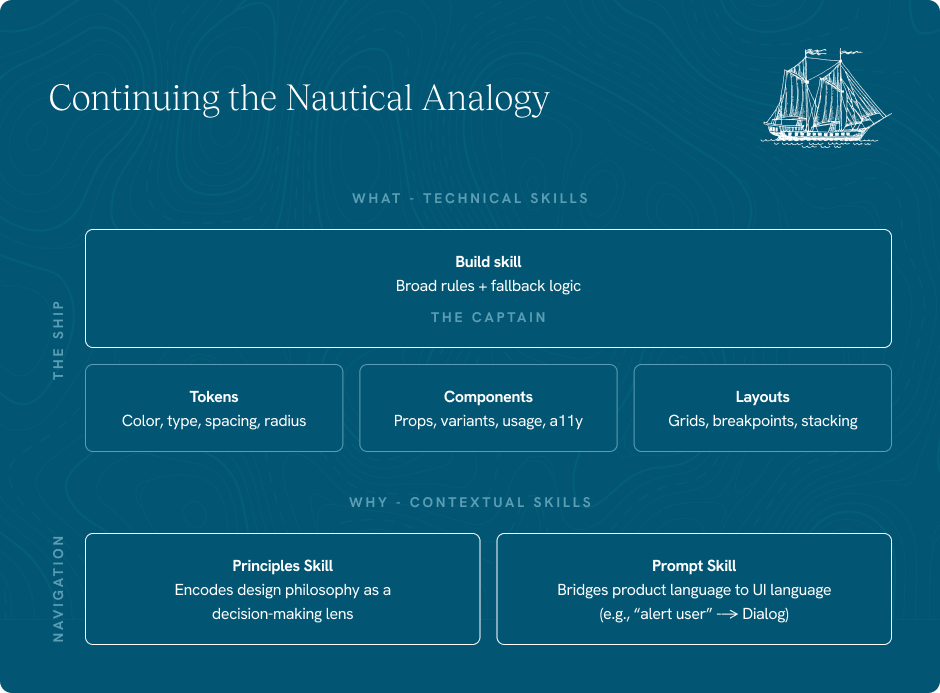
Together, the skills act as a tiered intelligence layer. The analogy we use internally:
- The tokens, components, and build skills are the ship
- The principles are the navigation tools
- And the build skill acts as the captain
The AI follows the ship's structure, navigates by the principles, and uses the captain's judgment when the map runs out.
Installing the workflow is intentionally low-friction. Skill files are dragged directly into Claude with a single prompt. When files change hands or move to a new Figma instance, a re-mapping step ensures the AI's component IDs stay in sync with the live library.
What success looks like — and how we're measuring it
We defined success across three dimensions, because "the output looks pretty good" is not a standard.
The first is system conformity
Can the AI reliably use what's in the design system without deviating or hallucinating? We test this by building gold-standard screens manually — a human-designed baseline — then prompting the AI to recreate them from scratch, adding skill files incrementally to isolate where each one is doing its job. Measures include token usage (nothing hardcoded), component accuracy, layout fidelity, proper state handling, and whether the AI stays within the system or starts inventing its own patterns.
The second is intent translation
Have we closed the gap between product language and UI language well enough that a PM's prompt produces good output without needing to reference the design system directly? This is where the prompt skill does its work — mapping "I need a pattern that alerts the user to an important decision" to "use the Dialog component" without the PM needing to know that.
The third is constructive fallbacks
When the AI encounters a situation the skills don't cover, does it fail gracefully or fail loudly? A good fallback means placeholder elements, a clear signal that something is missing, and ideally a surfaced gap that feeds back into the system. A bad fallback means a hallucinated component that makes it into engineering.

What changes when the whole crew can navigate
For product managers
The immediate benefit is speed to alignment. Instead of waiting for a designer to translate a feature spec into something stakeholders can react to, a PM can generate a high-fidelity mockup in the same sitting they wrote the brief. That mockup isn't pixel-perfect, but it's close enough to the real product that it drives real decisions — and it's built from the actual component library, not a rough approximation.
For developers
It closes the gap between design intent and implementation. When a developer needs to build a new screen or extend an existing pattern, the generative workflow gives them a starting point that's already token-correct and component-compliant. The decisions that usually happen at the keyboard — which spacing value, which text style, which pattern fits — have already been made.
For designers
It's a reallocation of where their expertise goes. The screens that can be generated, get generated. The screens that require judgment, nuance, or something genuinely new are where designers spend their time. The ceiling for design quality goes up because the floor is handled.
The prerequisite nobody talks about
None of this works without a well-structured design system to begin with. If your tokens are inconsistent, your components are undocumented, or your library is a graveyard of one-off patterns, the AI will faithfully reproduce the chaos. Generative design workflows are a multiplier — they amplify what's already in the system, for better or worse.
That's actually the most important business case for investing in design system hygiene: it's no longer just about consistency at design handoff. It's about whether your system is legible enough for an AI to reason from. A design system that's structured for AI is a design system that's also easier for humans to use, maintain, and extend. The work pays dividends in both directions.
If your team is feeling the execution gap — between roadmap ambitions and design bandwidth — and you're wondering whether a generative workflow is the right next step, we're happy to talk through what it would take to get your system ready. Reach out to Craig Higdon, our Head of Client Services, at craig@creaturestudio.com to start the conversation.